

Skip to content

Editmamei Connect

Send a photo. Get it back edited.

Add Connect to your AI app once. Then send a photo from your phone and say what you want. It's edited on our server with real editing tools, not redrawn. Nothing to install.

150 free credits to start, plus up to 50 more each month. Works in Claude, ChatGPT and other AI apps that add connectors.

A real Connect session: the request is the one that was sent, and each step is the session's own.

Editmamei Connect is a hosted MCP server: a connector your AI app signs in to, so it can edit photos with professional tools.

How it works

To our server, and back, edited.

Your AI plans the edit in the chat. Editmamei's server does each step on your photo and shows your AI a small preview, so it can check its work. The finished photo comes back as a download.

Your requestEach step, and asmall preview backYour photo: up byan upload link,back as a download✎Your phoneYour AI app,with Connect addedThe AI modelPlans each stepEEditmamei's serverEdits with real tools.Uploads deletedafter 24 hours

Your photo, to and from Editmamei The conversation with your AI

Edited, not redrawn.

Selections, masks, adjustments and retouching, on the photo you sent. AI finds things in the photo and fills in where you remove something; the rest is ordinary editing.

Uploads deleted after 24 hours.

Uploaded photos are deleted 24 hours after upload, and download links stop working after 24 hours.

Your AI sees small previews.

So it can check each step before it moves on, the same as looking at a photo in any chat.

The details are in Connect's Privacy Policy.

What people edit with it

Real edits, straight from a chat.

Four real Connect sessions, each with the steps it took. Pick one.

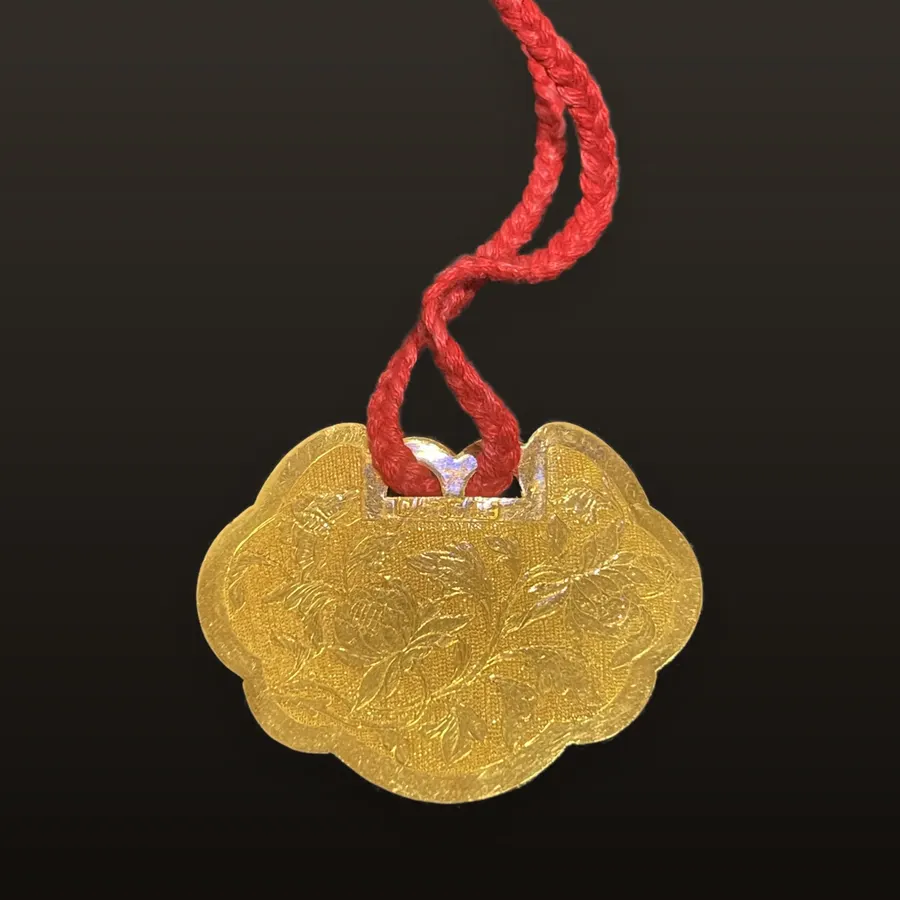
A gold pendant, after the edit Edited with Connect

From countertop to listing

The request “Make this an Etsy listing photo.”

What it did

  1. 1 Cut the pendant out and set it on a charcoal gradient, keeping the gold its true color.
  2. 2 Cropped so the cord runs off the top.
  3. 3 Sized to 2000 × 2000, Etsy's recommended minimum, without softening the engraving.
See every step

A real Connect session. Steps are from the session's own record.

More real edits are in the gallery.

Things to ask for.

  • “Remove the trash can on the left side of the photo.”
  • “Turn this into a product photo for my Etsy shop, on a pure white background.”
  • “Show me this shirt in navy, olive and burgundy.”
  • “Blur the background like portrait mode.”
  • “Make it black and white with a dramatic sky.”
  • “Is this photo ready for an Amazon listing?”

See everything Connect can do

Set up

Set it up once. Then it's on your phone.

  1. 1 · Add the connector

    In Claude, open Settings, then Connectors, and add a custom connector with this URL. Other AI apps have a similar setting.

    https://connect.editmamei.com/mcp
  2. 2 · Sign up with your email

    Your AI app opens Connect's sign-in. Confirm your email and you're in, with 150 free credits to start.

  3. 3 · Edit from your phone

    A connector you add in Claude comes with you to the Claude app on your phone. Ask for an edit and Connect sends you a link to upload the photo.

Start free The full setup steps are at connect.editmamei.com.
The launch film: a real Connect session, from adding the connector to the download link. 70 seconds, with sound.

What it costs

Free to start. Pay as you go after that.

Free

150 credits when you sign up, plus a top-up of up to 50 more each month.

Packs

750 credits for $7, or 2,000 for $15. Pack credits never expire.

Monthly

1,500 credits a month for $10, or 7,500 for $35. Unused monthly credits expire when the plan renews.

You can see your balance, and buy more, in your Connect account. See Connect pricing

Good to know.

  • What you get back

    The finished photo as JPEG, PNG, WebP or TIFF, or a layered PSD to keep working on.

  • Up to ten at a time

    Send up to ten photos on one upload link, and run the same edit across up to ten at once.

  • RAW files

    RAW photos work on the larger workspace, which you can switch to in your Connect account.

  • Which AI apps

    Claude on the web, desktop and phone, ChatGPT, and other AI apps that add remote MCP servers as connectors, such as Cursor, VS Code and Muse.

Have Photoshop or GIMP? Editmamei Desktop edits on your own computer, in layers you keep. Free.

Connect has its own Terms of Service and Privacy Policy, separate from this site's.